Tuesday, 1 November 2011

ComputeHASH Utility v0.9


ComputeHASH Utility - Program to calculate checksums, supports a variety of algorithms.

ComputeHASH Utility Checksums:
Compute hashes for Adler32, Crc32, Md4, Md5, Sha1, Sha256, Sha384, Sha512, Ripemd160, Tiger, Whirlpool
Checks file hash comparison (multi algorithms)
Computes files and strings
Create *. sfv, *. md5 files
Read *. sfv, *. md5 files
Copy to Clipboard
Export to text file

Compatiblity:
Windows 7
Windows 8
Windows Vista
Windows XP

Changelog 0.9:
Bug fixes


Bullrushsoft SWF To EXE Convertor v1.9


Bullrushsoft SWF To EXE Convertor v1.9

Bullrushsoft SWF to EXE Converter is a smart and easy-to-use wizard-like tool that enables the creation of executable files from SWF Flash files. With the help of this friendly tool you may easily compile licensed, stand-alone executables of any SWF file. Use it to protect the copyright of your SWF movie or to turn your SWF projects, games or presentations into profitable commercial products. You may also easily customize your product's information.

Features and benefits

Build desktop application without Windows program knowledge
Pack, compress and protect flash and related files(XML/FLV/JPG, etc)
Customize your product informations, icon and copyright
Read-to-run, run on CD, no temporary files, difficult to steal
Open MS-Office document and Adobe-PDF file directly
Delay self-destruction, just a demo for your customer

Acala DVD Ripper Professional 6.1.6

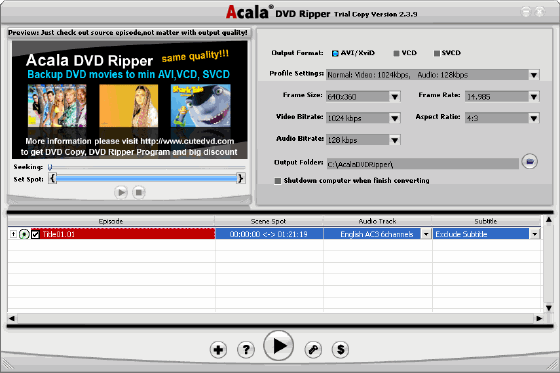
Acala DVD Ripper Pro - DVD video converter. Rip DVD to other video formats, support for AVI, DivX, XviD, VCD, SVCD, MPEG1, MPEG2, MPEG4 and other video formats, Setting conservation, selection of files to retrieve, preview ...

Features
* Rip DVD to other video formats
* Support AVI, DivX, XviD, VCD, SVCD, MPEG1, MPEG2, MPEG4 and other video formats
* Setting conservation
* Selection of files to extract
* Preview
* Automatically shutdown your computer after shutdown

Key Features
* Convert your DVD movies to the following formats with high speed:
o MP4 video for iPod, iPhone and Apple TV
o MP4, AVC video for Sony PSP
o MP4, MPEG2, FLV video for Sony PS3
o MP4, WMV video for Microsoft Zune
o 3GP video for mobile phone
o FLV video for YouTube
o MPEG-1, MPEG-2, MPEG-4, AVI video
* User-friendly interface
* Advanced conversion technology - provide excellent image and sound quality
* Smaller-sized outputs can save more space for your portable video players
* Convenient default output settings for beginners
* Powerful customization settings for video, audio and recording mode etc
* Build-in DVD player to playback DVD movie for preview
* Automatically shutdown computer after ripping is done
* 24-hour technical support

Auslogics Disk Defrag v3.3.0.0 Multilanguage

Auslogics Disk Defrag - Program designed to help get rid of the problem hard drive - fragmentation. The program is very easy to use and works fairly quickly, because it requires a lot of time for analysis. After the completion of its work can get a detailed report on completed transactions, as well as look at a map of disk fragmentation. Disk Defrag will optimize and manage files on your hard drive, defragment the file structure and speed up applications and Windows. With Disk Defrag disk of your computer will work perfectly fast and stable.

Main characteristics of Auslogics Disk Defrag:
• Optimize the file system. Moving system files to the faster part of the hard drive, and clearing the backup band MFT.
• Integration of space. Auslogics Disk Defrag prevents the fragmentation by consolidating free zones in one contiguous block.
• The ability to automatically start when the system is idle. Work in the background.
• A flexible scheduler. Disk Defragmentation will be much more useful if it is done regularly.
• Ability to defragment single file or folder that can be useful in the absence of time to complete defragmentation.
• Support for multi-terabyte volumes. Ability to work with multi-terabyte disk or multiple disks simultaneously.
• A list of fragmented files. Auslogics Disk Defrag analyzes the hard drive and compile a list of files to be ordering.
• Multi-lingual interface.

What's new:
* Returned setup time the computer is idle before avtodefragmentatsii
* Fixed issue with positioning of the forms if you disable the second monitor
* Improved performance
* Fixed bugs

SysCheckUp 3.11.0


SysCheckUp is software for Windows designed to repair your computer and keep your computer running at maximum performance. SysCheckUp uses several different methods to accomplish this task including removing unnecessary files/registry data and repairing multiple problems. SysCheckUp is unique from most other repair/optimization software for Windows.

Registry Cleaner:
· Scans: file extensions, ActiveX/COM, startup items, most recently used file lists, services, and more in your registry and removes the errors/unnecessary data it finds
· Helps to make your computer more manageable
· Can indirectly fix some problems related to the registry
· Possibly increase system performance
· Significantly more thorough than many other registry cleaners

Registry Compactor:
· Analyzes your registry and detects if it can be compacted
· Compacts your registry to speed up registry access times possibly increasing system performance

Startup Optimizer:
· Optimizes your Windows startup for faster boot times

Registry Compactor:
· Analyzes your registry and detects if it can be compacted
· Compacts your registry to speed up registry access times possibly increasing system performance

Shell Extension Manager:
· Allows you to enable/disable shell extensions that are loaded into Windows Explorer
· Disable problematic shell extensions that slow down Windows Explorer or causes Windows Explorer to crash

Registry Backup/Restore:
· Creates registry backups and restores them at a later date if your registry becomes corrupted

Disk Cleaner:
· Scans your hard drive for unnecessary files and deletes them to free up space for more useful files and to possibly increase performance

Home Page - http://www.syscheckup.com/


WinHex 16.2 SR-3


WinHex 16.2 SR-3 | 2.1 Mb

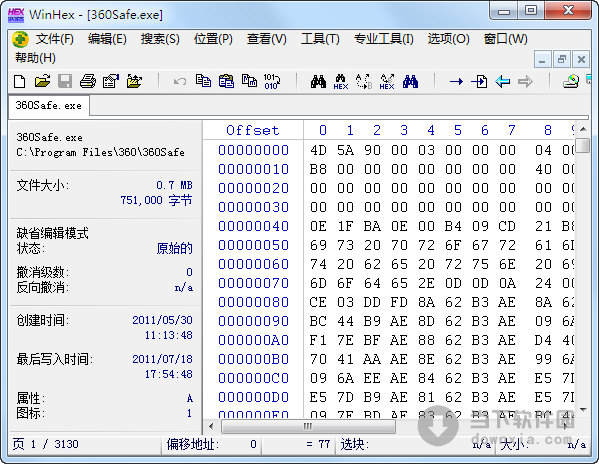
WinHex is in its core a universal hexadecimal editor, particularly helpful in the realm of computer forensics, data recovery, low-level data processing, and IT security. An advanced tool for everyday and emergency use: inspect and edit all kinds of files, recover deleted files or lost data from hard drives with corrupt file systems or from digital camera cards.

Features:
• Disk editor for hard disks, floppy disks, CD-ROM & DVD, ZIP, Smart Media, Compact Flash, ...
• Native support for FAT, NTFS, Ext2/3, ReiserFS, Reiser4, UFS, CDFS, UDF
• Built-in interpretation of RAID systems and dynamic disks
• Various data recovery techniques
• RAM editor, providing access to physical RAM and other processes' virtual memory
• Data interpreter, knowing 20 data types
• Editing data structures using templates (e.g. to repair partition table/boot sector)
• Concatenating and splitting files, unifying and dividing odd and even bytes/words
• Analyzing and comparing files
• Particularly flexible search and replace functions
• Disk cloning (under DOS with X-Ways Replica)
• Drive images & backups (optionally compressed or split into 650 MB archives)
• Programming interface (API) and scripting
• 256-bit AES encryption, checksums, CRC32, hashes (MD5, SHA-1, ...)
• Erase (wipe) confidential files securely, hard drive cleansing to protect your privacy
• Import all clipboard formats, incl. ASCII hex values
• Convert between binary, hex ASCII, Intel Hex, and Motorola S
• Character sets: ANSI ASCII, IBM ASCII, EBCDIC, (Unicode)
• Instant window switching. Printing. Random-number generator.
• Supports files >4 GB. Very fast. Easy to use.

Home Page - http://www.x-ways.net/

Visit This


Design by Free WordPress Themes | Bloggerized by Lasantha - Premium Blogger Themes | Lady Gaga, Salman Khan

close button